




Windscribe

Free VPN for Fire TV Stick.

10 GB/Month.On the Appstore.

Windscribe lives in the Amazon Appstore: no Downloader app, no sketchy APK site, and no typing passwords with the remote.
Download for Fire TV Stick
Rated 4.7 by Trustpilot • 13K reviews
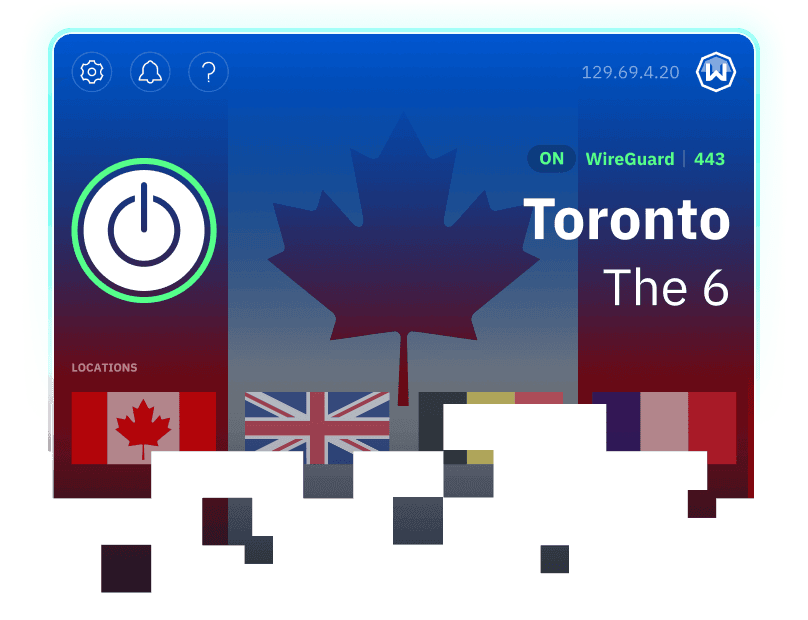
Windscribe for Fire TV Stick, connected and sitting over the planet

Built for Fire OS Fire TV Devices

If your home screen looks like Amazon turned a billboard into a remote-controlled maze, Windscribe runs on it natively.
  • Operating System
    Fire OS
  • Hardware
    Fire TV Stick, Stick Lite, 4K, 4K Max, Cube, and Fire TV smart TVs
  • Installation
    Amazon Appstore
  • Sign-In
    Lazy Login, 6-Digit Code
Got a newer Vega OS Fire TV device, like Fire TV Stick 4K Select or Fire TV Stick HD? Windscribe's Fire OS app won't install directly on it right now. Use Windscribe on a VPN-capable router instead.
Windscribe on Fire TV Stick specifications

Privacy You Can Verify

How to install

Set Up Windscribe on Amazon Fire TV Stick

  1. 1. Search the Amazon Appstore
    Find Windscribe, hit Download.
  2. 2. Skip the Password
    Use Lazy Login with your phone or browser.
  3. 3. Pick a Server
    Connect and start watching. No email needed to start.
Free vs Pro

What You Get for Free (and What Pro Adds)

Windscribe Free is the same TV app and same encryption as Pro, with a monthly data cap and fewer locations.
Data
Locations
Devices
Sign-In
Extras
PopularFree$0, forever
Data
10 GB data per month: 2 GB before you confirm your email
Locations
10 countries: US, Canada, Germany, Switzerland and 6 more
Devices
Unlimited devices: No cap on devices you can use at once
Sign-In
Lazy Login: Sign in with a 6-digit code, no remote typing
Extras
Same encryption as Pro: AES-256 and a strict no-logs policy

RecommendedProfrom $3/mo
Data
Unlimited data: No strings attached
Locations
69+ countries, 135+ cities: The full suite of Windscribe locations
Devices
Unlimited devices: No cap on devices you can use at once
Sign-In
Lazy Login: Sign in with a 6-digit code, no remote typing
Extras
Static IP add-on: The same IP every time for fewer proxy errors

Free Forever. Why?

Free is our marketing budget. We don't run ads, sell your data, or sneak you into a paid trial.
Need more data or countries? Go Pro. Post about us on X and get an extra 5 GB every month. Yes, really.
Download for Fire TV Stick

4 Ways to Use Windscribe With Amazon Fire TV Stick

  • Amazon Appstore
    Search, download, done. Updates install themselves.
  • Remote Delivery
    Send it to your stick from Amazon's website.
  • APK via Downloader
    Sideload the Fire TV APK if the Appstore acts up.
  • Router
    Covers the 4K Select and any non-Fire screens.

Stream What You Actually Want to Watch

Part of Windscribe's job is bringing the shows that aren't always available in your region to your living room.

Get Windscribe for Amazon Fire TV Stick

Fire it up, stream what's hot in the country of your choice, and keep your privacy from going up in smoke.

Frequently Asked Questions

Does Fire TV Stick have a built-in VPN?

No. Fire OS lets you install VPN apps, but Amazon doesn't bundle a VPN of its own. Download Windscribe from the Amazon Appstore to add one in a couple of clicks.

Do I need to sideload a VPN on my Fire TV Stick?

Not with Windscribe. The app is in the official Amazon Appstore, so you can skip the Downloader app and the "unknown sources" setting altogether. A Fire TV APK is still available as a backup if the Appstore ever misbehaves.

How do I install a VPN on Fire TV Stick?

Search for Windscribe from your Fire TV home screen (or ask Alexa), then press Download. Open the app, choose Lazy Login, and enter the 6-digit code on your phone or in a browser. Pick a server, connect, and you're streaming privately.

Does Windscribe work on the Fire TV Stick 4K Select?

Not yet. The 4K Select runs Vega OS, Amazon's new Linux-based system, and apps built for Fire OS can't run on it. Until a Vega version is available, the workaround is running Windscribe on your router so the stick is covered at the network level.

Which Fire TV devices does Windscribe support?

Any device running Fire OS. That includes the Fire TV Stick Lite, Fire TV Stick, Fire TV Stick 4K and 4K Max, Fire TV Cube, and smart TVs with Fire TV built in, like Amazon's Omni series and models from Insignia and Toshiba.

Is the free tier enough for a Fire TV Stick?

For light viewing, yes. You get 10 GB a month once your email is confirmed, which covers a few movies or a weekend of catch-up. Anyone streaming every night will run through it fast and should look at Pro.

What's the best VPN for Fire TV Stick?

One that installs from the Appstore, signs in without remote gymnastics, and doesn't charge you per device. Windscribe does all three with a native Fire TV app, Lazy Login, unlimited devices, and no identifying logs. The free plan means you can try it before spending anything.

Can I use Windscribe with Kodi on Fire TV Stick?

Yes. Turn on Windscribe before launching Kodi, and every stream Kodi pulls in goes through the encrypted tunnel. It's a solid way to keep your ISP from singling out streaming traffic.

Why does Prime Video show an error when I'm connected?

Because streaming platforms, including Amazon's own Prime Video, block some VPN IP addresses. Try a different Windscribe server in the same country. A Static IP can cut down on repeat blocks, but no VPN can guarantee a platform will never block it.

Will a VPN slow down my Fire TV Stick?

A little, and older sticks feel it most. Encryption takes processing power, and the Lite and older HD models have less to spare than the 4K Max. Use WireGuard, which is the lightest protocol, and pick a nearby server for the smoothest playback.